
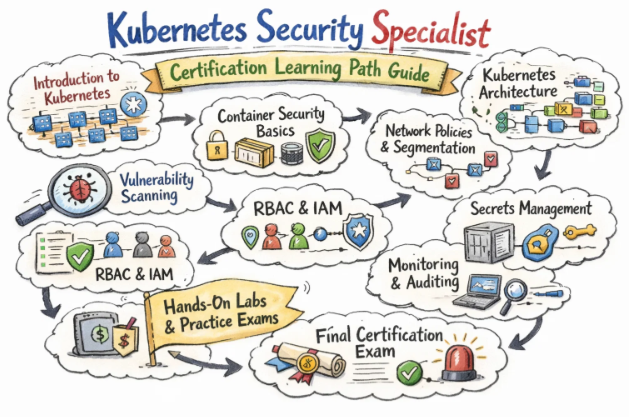
Introduction
Kubernetes is now a core platform for running modern, container‑based applications in many organisations. As more business‑critical workloads move to Kubernetes, security is no longer a “nice to have”; it is a key requirement for every engineer and manager involved in design, build, or operations. The Certified Kubernetes Security Specialist (CKS) certification is designed to prove that you can secure Kubernetes clusters and workloads in real, production‑like environments.
This master guide is written for working engineers and managers in India and across the world. It explains the CKS certification in simple words: what it covers, who should take it, what skills you build, how to prepare in realistic timelines, and how it fits into wider DevOps, DevSecOps, SRE, AIOps/MLOps, DataOps, and FinOps career paths.
What Is the Certified Kubernetes Security Specialist (CKS)?
The Certified Kubernetes Security Specialist (CKS) is an advanced, hands‑on certification for people who want to specialise in Kubernetes security. It is built and maintained by the Cloud Native Computing Foundation (CNCF) and The Linux Foundation.
Key points about the exam:
- It is online and remotely proctored.
- It is fully performance‑based: you solve tasks on a live Kubernetes cluster using the terminal.
- It is time‑bound (around 2 hours), so you must work fast and accurately with
kubectl, YAML, and security tools. - You must already hold a valid Certified Kubernetes Administrator (CKA) to be eligible for CKS.
The CKS exam focuses on security across the full Kubernetes lifecycle, including cluster setup, system hardening, workload security, supply chain protection, and monitoring and incident response.
Who Should Take the CKS Certification Training?
CKS is not an entry‑level exam. It is for people who already work with Kubernetes and want to go deeper into security. It is ideal for:
- Security Engineers and DevSecOps professionals who protect container platforms and workloads.
- Senior DevOps Engineers, SREs, and Platform Engineers who own production Kubernetes clusters.
- Cloud Engineers and Architects who design secure platforms on Kubernetes.
- Engineering Managers and technical leads who make or review security decisions for Kubernetes‑based systems.
Before you start CKS preparation, you should:
- Be comfortable with Kubernetes at CKA level (cluster setup, workloads, networking, storage, troubleshooting).
- Understand Linux basics, shell, and networking.
- Know basic security ideas such as least privilege, RBAC, TLS, certificates, and firewall rules.
What You Will Learn in a CKS Training Course
A good CKS training course (for example from DevOpsSchool) helps you learn how to secure Kubernetes at every layer, from the operating system to the application and supply chain.
You can expect to learn:
- Cluster and control plane security
- Secure configuration of API server, controller manager, scheduler, and kubelet.
- Using RBAC, ServiceAccounts, and admission controllers to enforce least privilege and safe APIs.
- Node and system hardening
- Locking down Linux nodes: minimal packages, secure SSH, proper file permissions.
- Basic runtime hardening such as limiting capabilities and using seccomp or similar controls.
- Workload and runtime security
- Using Pod Security (or Pod Security Standards) and securityContext fields to avoid running as root and to drop unnecessary capabilities.
- Configuring read‑only file systems, runAsUser, and other pod‑level security settings.
- Network and microservice security
- Designing NetworkPolicies to control which pods and namespaces can talk to each other.
- Securing ingress paths and reducing unnecessary exposure of services.
- Supply chain and image security
- Scanning container images for vulnerabilities.
- Using trusted base images, private registries, and image tags correctly.
- Monitoring, logging, and incident handling
- Using audit logs, cluster logs, and metrics to watch for suspicious behaviour.
- Basic steps to isolate, analyse, and respond to potential security incidents.
Real‑World Projects After CKS
After completing CKS training and certification, you should be able to:
- Review a Kubernetes cluster and create a hardening plan for the API server, node configuration, RBAC, and admission controls.
- Lock down workloads using Pod Security settings, securityContext, and least‑privilege service accounts.
- Write and apply NetworkPolicies that block unwanted traffic while still allowing required service communication and DNS.
- Integrate container image scanning and policy checks into CI/CD so that risky images are stopped before production.
- Use logs and audit data to detect unusual behaviour and follow clear steps to contain and investigate incidents.
CKS in the Kubernetes Certification Family
CKS sits near the top of the Kubernetes certification ladder as the “security specialist” credential. A simple view of the family:
- KCNA / KCSA – Intro level, covering cloud‑native and Kubernetes basics.
- CKA – Administration‑focused; cluster install, config, networking, storage, troubleshooting.
- CKAD – Application‑focused; design and deploy apps on Kubernetes.
- CKS – Security‑focused; harden clusters and workloads end‑to‑end.
Most professionals follow a path like:
- Learn basics → earn CKA → optionally earn CKAD → then specialise with CKS.
Certification Table – CKS and Related Kubernetes Tracks
| Track | Level | Who it’s for | Prerequisites (recommended) | Skills covered (summary) | Recommended order |
|---|---|---|---|---|---|
| Certified Kubernetes Security Specialist (CKS) | Professional | Security, DevSecOps, senior DevOps/SRE, platform engineers | Strong Kubernetes skills (CKA), Linux and security basics | Cluster hardening, node/system hardening, workload and network security, supply chain security, monitoring and incident response | After CKA (and optionally CKAD) as security specialisation |
| Certified Kubernetes Administrator (CKA) | Professional | Admins, DevOps, SRE, platform engineers | Linux, containers, Kubernetes basics | Cluster install and upgrade, configuration, networking, storage, troubleshooting | First core admin certification before CKS |
| Certified Kubernetes Application Developer (CKAD) | Professional | Developers and DevOps working with Kubernetes apps | Programming, containers, Kubernetes basics | App design and deployment on Kubernetes, config, secrets, probes, services, jobs | Before/alongside CKS for app‑security focus |
Certified Kubernetes Security Specialist (CKS)
What it is
The Certified Kubernetes Security Specialist (CKS) exam checks whether you can secure Kubernetes clusters and workloads in real conditions. During the exam, you log into live clusters and complete security‑focused tasks at the command line within a strict time limit.
Who should take it
- Security Engineers and DevSecOps professionals who work with Kubernetes.
- Experienced DevOps, SRE, and Platform Engineers who are responsible for secure operations.
- Cloud Architects and technical leads who design and review Kubernetes security controls.
Skills you’ll gain
- Plan and apply cluster hardening steps for the control plane and nodes.
- Use RBAC, admission controls, and Pod Security settings to enforce least privilege.
- Design and implement NetworkPolicies that isolate workloads and limit lateral movement.
- Build simple but effective supply chain defences with image scanning and trusted registries.
- Monitor security‑relevant logs and metrics and follow structured steps to handle incidents.
Real‑world projects you should be able to do after it
- Take a real Kubernetes cluster, identify key security weaknesses, and fix them.
- Lock down production namespaces with appropriate Pod security settings, service accounts, and resource policies.
- Introduce NetworkPolicies into a running environment without breaking valid traffic.
- Integrate image scanning and policy checks into your CI/CD pipelines.
- Document and run a basic incident response process for Kubernetes security events.
Preparation Plan for CKS
7–14 Day Plan – Fast Track
Use this if you already have strong CKA‑level skills and some security experience:
- Days 1–2: Read the official CKS exam domains and weights; mark which areas are weakest for you.
- Days 3–6: Do focused labs for weak topics such as NetworkPolicies, Pod security settings, image scanning, or audit logging.
- Days 7–10: Take two or more timed practice exams or lab packs; practise fast
kubectl, quick YAML edits, and using documentation efficiently. - Remaining days: Light review of notes and another round of incident‑style practice tasks.
30 Day Plan – Working Professional
Use this if you are a working DevOps/SRE/security engineer with solid Kubernetes skills, but limited time per day:
- Week 1:
- Refresh Kubernetes admin basics and read the CKS exam outline.
- Focus on cluster setup and hardening: API server flags, kubelet security, RBAC, admission control basics.
- Week 2:
- Study system hardening: node OS lock‑down, minimal services, file permissions, and runtime restrictions.
- Practise workload security: Pod Security, securityContext, running as non‑root, dropping capabilities.
- Week 3:
- Work on microservice and network security: NetworkPolicies, default‑deny strategies, safe ingress patterns.
- Add supply chain security labs: image scanning, registries, and simple policy checks.
- Week 4:
- Focus on monitoring, logging, and runtime security; practise reading audit logs and spotting issues.
- Do at least two full, timed exam simulations and review every error.
60 Day Plan – Deep‑Dive
Use this if you have strong DevOps or development experience but are new to security depth:
- Weeks 1–2: Strengthen Kubernetes fundamentals to CKA level, especially RBAC, certificates, and network basics.
- Weeks 3–4: Learn core security concepts (least privilege, zero trust, segmentation, supply chain attacks) and apply them to Kubernetes clusters in labs.
- Weeks 5–6: Work through each CKS domain with repeated hands‑on practice, then run multiple timed practice exams to build speed and confidence.
Common Mistakes in CKS Preparation
- Attempting CKS without solid CKA‑level skills, leading to wasted time on basic tasks.
- Treating it like a theory exam and skipping hands‑on command‑line practice.
- Ignoring NetworkPolicies, Pod security, and RBAC, which appear frequently in real tasks.
- Spending too much time on low‑weight topics and too little on high‑weight ones like workload and supply chain security.
- Not practising under time pressure and not using efficient
kubectland YAML techniques.
Best Next Certification After CKS
Based on current trends in software and security certifications (same track, cross‑track, leadership):
- Same track (security depth): move into broader cloud security or security architect certifications that cover multi‑cloud and application security, building on your Kubernetes security base.
- Cross‑track (DevOps/architecture depth): add a cloud architect or DevOps‑focused certification from a major provider to show you can design secure, scalable systems end‑to‑end.
- Leadership path: pursue security leadership or architecture‑oriented programs that focus on risk, governance, and strategy, using CKS as proof of your technical foundation.
(When you write the blog, you can map these options to specific names from the Gurukul Galaxy article, kept in these three groups.)
Choose Your Path: 6 Learning Paths Around CKS
DevOps path
In the DevOps path, CKS plus CKA gives you both platform and security strength. You also build CI/CD and infrastructure‑as‑code skills so you can design pipelines that move fast but still enforce checks like image scanning, policy validation, and safe rollout strategies.
DevSecOps path
Here CKS is your main security badge. You combine it with secure coding, threat modelling, and policy‑as‑code knowledge. Your role is to embed security controls into each stage of the pipeline, working with both developers and security teams to make “secure by default” a reality.
SRE path
As an SRE, you handle reliability, incidents, and SLOs. With CKS, you can treat security incidents as first‑class events, integrate security signals into observability, and help harden the Kubernetes platform so that failures are less likely and easier to handle when they occur.
AIOps/MLOps path
Kubernetes is widely used for ML serving, feature stores, and data pipelines. With CKS and ML/data skills, you can secure these platforms, protect sensitive data and models, and design safe rollout and rollback strategies for experiments and new versions.
DataOps path
Many data services (streaming, ETL, APIs) now run on Kubernetes. CKS helps you enforce RBAC, NetworkPolicies, and image controls around these services, while DataOps practices focus on data quality and lineage. Together, they give you secure, well‑governed data platforms.
FinOps path
Security and cost are linked. A breach is expensive, but over‑engineering can also waste money. With CKS and FinOps training, you can design Kubernetes platforms that apply the right security controls while still making efficient use of compute, storage, and networking resources.
Role → Recommended Certifications
| Role | Recommended certification flow (with CKS included) |
|---|---|
| DevOps Engineer | CKA → CKS → cloud DevOps/architect certification for end‑to‑end secure delivery |
| SRE | CKA → SRE/observability learning → CKS to align reliability and security |
| Platform Engineer | CKA → CKAD → CKS for designing secure, multi‑tenant Kubernetes platforms |
| Cloud Engineer | Cloud fundamentals → CKA → CKS → cloud provider architect/security tracks |
| Security Engineer | Security basics → CKA/CKAD → CKS → broader cloud/app security certifications |
| Data Engineer | Data platform basics → CKA/CKAD → CKS for securing data services on Kubernetes |
| FinOps Practitioner | Cloud fundamentals → CKA → CKS → FinOps and governance‑oriented programs |
| Engineering Manager | Cloud and Kubernetes basics → CKA/CKAD → CKS → architecture and security‑leadership paths |
Training Institutions for CKS Certification
- DevOpsSchool: Provides focused CKS‑oriented training that combines theory with hands‑on labs, real‑world scenarios, and exam‑style tasks. It is well suited for working professionals and managers who want to connect Kubernetes security concepts to real production environments.
- Cotocus: Offers structured Kubernetes and cloud‑native learning paths, combining CKA, CKAD, CKS, DevOps, and cloud provider topics so that learners build a complete skill stack over time.
- Scmgalaxy: Emphasises practical DevOps and container workflows. Its programs help learners see how CKS‑level security practices such as RBAC, NetworkPolicies, and image scanning fit into CI/CD and operations.
- BestDevOps: Curates DevOps and cloud courses, including Kubernetes security modules, to help engineers and managers build profiles aligned with modern platform and security roles.
- devsecopsschool.com: Specialises in DevSecOps and is a strong match for CKS candidates who also want skills in secure coding, threat modelling, and policy‑as‑code.
- sreschool.com: Focuses on SRE topics like SLOs, incidents, and reliability, and integrates security thinking into reliability practices for Kubernetes‑based systems.
- aiopsschool.com: Works on AIOps and intelligent operations using telemetry from Kubernetes clusters. CKS skills help learners understand which security signals matter and how to feed them into automation.
- dataopsschool.com: Targeted at DataOps and analytics, it shows how CKS‑style security controls apply to data pipelines and services that run on Kubernetes.
- finopsschool.com: Teaches FinOps and cloud cost management; CKS‑trained professionals can better explain how security controls and logging choices impact cost and governance.
FAQs – Certified Kubernetes Security Specialist (CKS)
- Is the CKS exam very difficult?
It is an advanced, hands‑on exam and can feel demanding, especially if your Kubernetes basics are not strong. With solid CKA‑level skills and focused practice, it is challenging but realistic. - How long does it usually take to prepare for CKS?
Many working professionals take 4–10 weeks, depending on how much time they can invest per week and how strong their starting Kubernetes and security knowledge is. - Do I need CKA before taking CKS?
Yes. You must hold a valid CKA before you are allowed to take the CKS exam, and the exam assumes that level of cluster administration skill. - Is CKS useful if my company uses managed Kubernetes like GKE, EKS, or AKS?
Yes, because the core security concepts (RBAC, Pod security, NetworkPolicies, supply chain security) are the same across managed Kubernetes services. - What is the main career benefit of CKS?
CKS shows that you can secure Kubernetes clusters and workloads in practice, not just in theory. This is highly valued in DevSecOps, security engineering, and senior DevOps/SRE roles. - Is CKS more relevant for security teams or platform teams?
It is valuable for both. Security teams gain deep platform knowledge, and platform teams gain strong security skills. It is ideal for roles that sit at the intersection of security and operations. - How is CKS different from general cloud security certifications?
General cloud security exams cover many services at a higher level. CKS goes deep into Kubernetes security with live tasks, making it very specific and practical. - Can developers benefit from CKS, or is it only for admins?
Senior developers, tech leads, or people in DevSecOps roles can benefit, especially if they already have CKAD or CKA and are involved in design and review of critical services. - Why do some people fail CKS on the first attempt?
Common reasons include weak Kubernetes fundamentals, lack of hands‑on security labs, poor time management, and focusing on less important topics instead of high‑weight domains like workload and supply chain security. - Does the CKS certification expire?
Yes. CKS is valid only for a defined period. You must recertify after that to prove your skills remain current with new Kubernetes and security practices. - Is CKS recognised and valued by employers?
Many organisations that use Kubernetes see CKS as a strong signal of security expertise and list it as a plus or preference for senior DevOps, SRE, platform, and security roles. - Can I pass CKS with self‑study alone?
It is possible if you are disciplined, use good labs, and practise timed scenarios. However, many busy professionals prefer structured training and exam‑style practice to reduce trial and error and speed up preparation.
Conclusion
The Certified Kubernetes Security Specialist (CKS) certification is a powerful way to prove that you can protect Kubernetes clusters and workloads in real production environments. It brings together cluster hardening, workload security, network controls, supply chain protection, and runtime monitoring into one practical, hands‑on exam that reflects how modern teams actually run Kubernetes.
For working engineers and managers in India and globally, CKS is best used after you are comfortable at CKA level, and when you are ready to own security, not just operations. It fits naturally into wider paths like DevSecOps, SRE, cloud architecture, and security engineering, and it pairs very well with CKA, CKAD, and major cloud provider certifications to create a strong, future‑ready, security‑focused career profile.

