
Introduction
Kubernetes has become an important part of modern cloud, DevOps, SRE, and platform engineering environments. However, many learners begin directly with YAML files and kubectl commands without understanding containers, Linux, networking, application deployment, or distributed systems.
This creates confusion. A learner may know how to create a Pod but may not understand why the Pod is failing, how traffic reaches it, where its data is stored, or how to secure it.
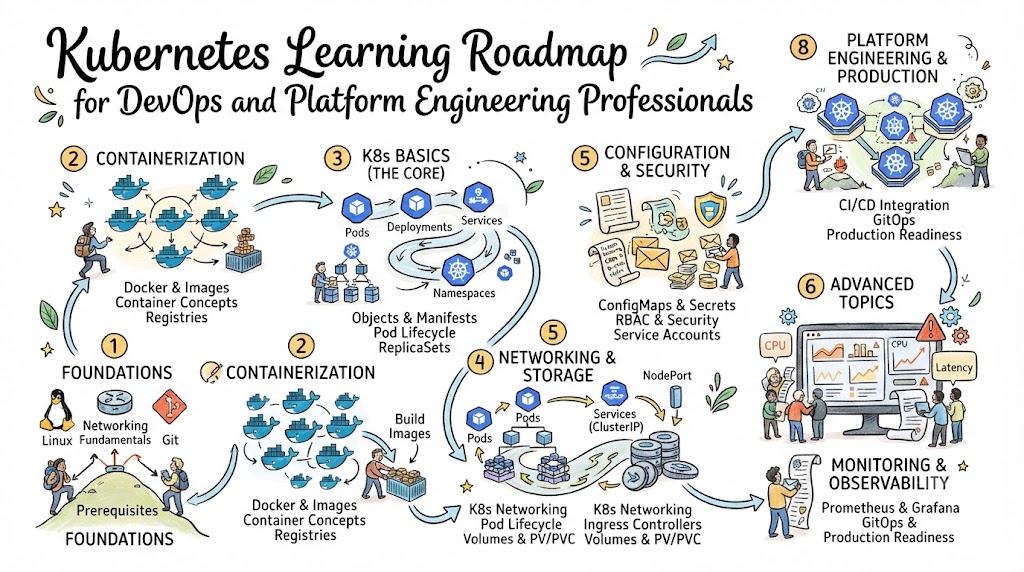
A structured Kubernetes learning roadmap solves this problem by organizing learning into clear stages. It starts with foundational knowledge, progresses through application deployment and cluster operations, and eventually covers security, observability, GitOps, reliability, and platform engineering.
Kubernetes is officially described as a portable and extensible open-source platform for managing containerized workloads and services through declarative configuration and automation. It supports capabilities such as scaling, self-healing, service discovery, rollouts, rollbacks, storage orchestration, and configuration management.
This article explains what to learn, how to practise each topic, which tools are relevant, what projects to build, and how Kubernetes knowledge connects with DevOps careers and engineering performance.
Why Kubernetes Learning Matters
For beginners
Kubernetes introduces practical knowledge about containers, networking, automation, infrastructure, application reliability, and cloud computing. It also helps beginners understand how modern applications move from source code to production.
For DevOps professionals
DevOps engineers use Kubernetes to automate application deployment, scaling, configuration, release management, and recovery. Kubernetes knowledge also improves coordination between infrastructure and application teams.
For SRE teams
Site Reliability Engineers need to understand workload health, resource consumption, availability, failure recovery, observability, and service-level objectives. Kubernetes provides several mechanisms that support these responsibilities.
For platform engineers
Platform engineers use Kubernetes as a foundation for internal developer platforms, standardized deployment workflows, reusable infrastructure services, and self-service environments.
Platform engineering focuses on building tools and processes that reduce infrastructure complexity for developers and improve self-service delivery.
For engineering managers
Managers do not need to operate every cluster personally, but they should understand Kubernetes costs, risks, skill requirements, security responsibilities, reliability limitations, and operational measurements.
For software organizations
Kubernetes can help organizations standardize container deployment across development, testing, staging, and production. However, successful adoption requires automation, governance, skilled teams, observability, and clear ownership.
Kubernetes in Modern Software Delivery
Kubernetes sits between containerized applications and the infrastructure on which they run. Developers package applications into containers, while Kubernetes schedules and manages those containers across available computing resources.
A Kubernetes cluster contains a control plane and one or more worker nodes. The control plane manages the overall cluster state, while worker nodes run application Pods. Important components include the API server, scheduler, controller manager, etcd, kubelet, networking components, and container runtime.
Kubernetes is commonly connected with:
- Git repositories for application and configuration code
- CI/CD systems for building and testing releases
- Container registries for storing images
- Infrastructure as Code tools for provisioning environments
- GitOps controllers for synchronizing desired configurations
- Monitoring tools for collecting metrics
- Logging platforms for investigating failures
- Security tools for scanning and policy enforcement
- Engineering intelligence systems for connecting deployment and incident data
Kubernetes is therefore not an isolated tool. It is part of a broader software delivery system.
Important Kubernetes Concepts
Cluster
A cluster is a group of computing resources managed by Kubernetes. It normally includes a control plane and worker nodes.
Node
A node is a physical or virtual machine that provides CPU, memory, storage, and networking for application workloads.
Pod
A Pod is the smallest deployable Kubernetes unit. It can contain one or more closely related containers that share networking and storage resources.
Deployment
A Deployment manages replicated application Pods. It supports controlled updates, scaling, and rollbacks.
Service
A Service provides a stable network endpoint for a changing group of Pods. This allows applications to communicate even when individual Pods are replaced.
Namespace
A namespace separates and organizes resources inside a cluster. Teams can use namespaces for applications, departments, environments, or access boundaries.
ConfigMap and Secret
A ConfigMap stores non-sensitive configuration. A Secret is designed for small amounts of sensitive information such as passwords, keys, and tokens. Secret management still requires encryption, controlled access, and secure external workflows.
Requests and limits
A resource request tells the scheduler how much CPU or memory a container needs. A limit restricts how much of that resource the container may consume. Correct settings support scheduling, capacity planning, stability, and cost control.
Desired state
Users define the expected state of an application through Kubernetes objects. Controllers continuously compare the desired state with the current state and attempt to correct differences.
Declarative configuration
In declarative management, teams store the required resource state in configuration files. Kubernetes determines whether each resource needs to be created, updated, or removed.
Step-by-Step Kubernetes Learning Process
| Step | What to Learn and Practise | Common Mistake | Expected Result |
|---|---|---|---|
| 1. Learn Linux | Processes, files, permissions, services, logs, packages and shell commands | Memorizing commands without troubleshooting | Ability to inspect hosts and containers |
| 2. Understand networking | IP addresses, DNS, ports, routing, load balancing, TLS and firewalls | Ignoring networking until applications fail | Ability to trace application traffic |
| 3. Learn containers | Images, containers, registries, volumes, networks and Dockerfiles | Treating containers like complete virtual machines | Ability to package and run applications |
| 4. Study architecture | Control plane, nodes, API server, etcd, scheduler, controllers and kubelet | Starting with YAML without understanding components | Clear understanding of cluster behaviour |
| 5. Practise core objects | Pods, Deployments, Services, namespaces, ConfigMaps and Secrets | Running individual Pods for production workloads | Ability to deploy a basic application |
| 6. Manage application health | Probes, requests, limits, autoscaling, updates and rollbacks | Using default settings everywhere | More stable and predictable workloads |
| 7. Learn storage and networking | PersistentVolumes, claims, storage classes, ingress and network policies | Assuming all workloads are stateless | Ability to operate realistic applications |
| 8. Add security | RBAC, service accounts, image security, admission controls and secret protection | Granting broad administrative permissions | Better workload and cluster protection |
| 9. Add operations | Monitoring, logs, traces, alerts, backups and incident procedures | Monitoring only node CPU and memory | Ability to detect and investigate failures |
| 10. Learn automation | Helm, Kustomize, CI/CD, GitOps and Infrastructure as Code | Making untracked manual production changes | Repeatable application delivery |
| 11. Build platforms | Templates, self-service workflows, policies and developer portals | Exposing every Kubernetes detail to developers | Safer and simpler developer experience |
| 12. Measure outcomes | Deployment data, failure rates, recovery time, SLOs and error budgets | Using metrics to rank individuals | Evidence-based improvement decisions |
The official Kubernetes basics tutorial follows a similar practical direction by teaching learners to create a cluster, deploy an application, expose it, scale it, update it, and debug it.
Relevant Kubernetes and DevOps Tools
Kubernetes environments normally require several supporting tool categories. No single tool is suitable for every organization.
The right choice depends on project size, cloud platform, budget, compliance requirements, existing integrations, security controls, operational maturity, and team experience.
| Tool | Main Purpose | Key Features | Best Suited For | Learning Difficulty |
|---|---|---|---|---|
| kubectl | Cluster interaction | Resource creation, inspection, logs and debugging | Every Kubernetes learner | Medium |
| Minikube or kind | Local clusters | Fast local practice and temporary environments | Beginners and CI testing | Easy |
| Helm | Application packaging | Templates, charts, values and release management | Reusable deployments | Medium |
| Kustomize | Configuration customization | Base files, overlays and patching | Environment-specific configuration | Medium |
| Argo CD or Flux | GitOps delivery | Git synchronization and drift detection | Automated Kubernetes delivery | Medium |
| Prometheus | Metrics monitoring | Time-series metrics, queries and alerting | Kubernetes and application monitoring | Medium |
| Grafana | Visualization | Dashboards and data-source integrations | Operational visibility | Easy to medium |
| OpenTelemetry | Telemetry collection | Metrics, logs and traces | Distributed application observability | Medium to advanced |
| Terraform | Infrastructure provisioning | Declarative cloud and cluster infrastructure | Repeatable environment creation | Medium |
| Trivy | Security scanning | Image, filesystem and configuration scanning | DevSecOps pipelines | Easy to medium |
| Kyverno or OPA Gatekeeper | Policy enforcement | Admission policies and compliance checks | Governed cluster environments | Advanced |
Kubernetes observability normally involves collecting and analysing metrics, logs, and traces to understand cluster health and application behaviour.
Practical Benefits
A well-planned Kubernetes implementation can provide:
- Faster delivery: Standard deployment objects and automated pipelines reduce manual release work.
- Improved reliability: Health checks, replicas, controllers and controlled updates help maintain application availability.
- Better collaboration: Application and infrastructure requirements can be reviewed through version-controlled configuration.
- Reduced manual work: Reconciliation, scheduling, scaling and rollout processes can be automated.
- Stronger visibility: Metrics, logs, traces and events provide operational context.
- Improved security: RBAC, policies, network restrictions and image controls create multiple security layers.
- Faster recovery: Rollbacks, replicas and documented incident procedures reduce recovery delays.
- Better decisions: Delivery and reliability data help teams identify weak processes and recurring risks.
Kubernetes includes self-healing, controlled rollouts, scaling, service discovery and configuration capabilities, but teams must configure and operate these features correctly.
Common Challenges and Solutions
| Challenge | Practical Solution |
|---|---|
| Too many tools | Begin with kubectl, containers, core objects and monitoring before adding advanced platforms |
| Weak fundamentals | Learn Linux, networking, Git and containers before cluster administration |
| Limited practical experience | Build applications, deliberately create failures and document recovery steps |
| Poor monitoring | Collect workload metrics, application signals, events, logs and traces |
| Excessive permissions | Apply least-privilege RBAC and review service-account access regularly |
| Uncontrolled configurations | Store manifests in Git and use pull requests, validation and GitOps |
| Unclear ownership | Assign owners for clusters, applications, alerts, policies and incidents |
| Resource waste | Monitor real usage and adjust requests, limits and scaling policies |
| Metric misuse | Analyse service and team workflows instead of ranking individuals |
| Cultural resistance | Introduce standards gradually and involve developers in platform design |
RBAC should give users and workloads only the permissions required for their responsibilities. Excessive access can create privilege-escalation and security risks.
Kubernetes Best Practices
Use declarative configuration
Store Kubernetes resources in version control. Review changes through pull requests and use automated validation before deployment.
Set resource requests
Requests help the scheduler place workloads correctly. Begin with measured values and adjust them using production observations.
Add meaningful health probes
Readiness probes should determine whether a workload can receive traffic. Liveness probes should detect situations where a restart can genuinely help.
Protect namespaces and networks
Use RBAC, resource quotas, Pod security controls, and NetworkPolicies. NetworkPolicies can restrict which Pods, namespaces, or IP ranges may communicate with workloads.
Centralize operational data
Container-local logs may disappear when Pods or nodes fail. Cluster-level logging should use storage and retention independent of individual containers.
Practise failure recovery
Regularly test failed rollouts, unavailable dependencies, node failures, exhausted resources, certificate problems, and backup restoration.
Avoid unnecessary complexity
Do not introduce service meshes, custom operators, multiple GitOps engines, or advanced policy layers before the team has a clear requirement.
Practical Examples
Application deployment
A development team creates a container image for an API and stores it in a registry. A Deployment runs three replicas, while a Service provides stable access. Readiness probes stop traffic from reaching unprepared Pods.
Controlled release
A CI pipeline builds and scans a new image. The configuration repository is updated with the approved image version. A GitOps controller applies the change and reports whether the rollout reached the expected state.
Production incident
A new release increases memory usage. Monitoring detects restarts and latency. Engineers review Pod events, logs and resource graphs, roll back the release, and later correct memory handling and resource settings.
Platform workflow
A platform team creates an approved application template containing deployment configuration, monitoring, security policies, ownership metadata and delivery pipelines. Developers use the template without manually assembling every component.
Real-World Use Cases
- Startups: Run a small managed cluster with simple CI/CD, monitoring and cost controls.
- Medium-sized companies: Standardize deployment patterns and create shared platform services.
- Large enterprises: Operate multiple clusters with governance, identity integration, policy enforcement and centralized observability.
- Cloud-native teams: Use containers, GitOps, autoscaling and distributed tracing.
- SRE teams: Manage SLOs, alerts, capacity, incidents and reliability improvements.
- Platform teams: Build self-service deployment paths and reusable infrastructure capabilities.
- Regulated organizations: Apply access controls, auditing, approved images, policy checks and evidence collection.
Kubernetes auditing can record security-relevant actions performed by users, applications and control-plane components, helping administrators investigate cluster activity.
Complete DevOps and Kubernetes Roadmap
| Stage | Important Concepts | Practical Exercise | Learning Outcome |
|---|---|---|---|
| DevOps fundamentals | Collaboration, automation, feedback and continuous delivery | Map a software delivery workflow | Understand the delivery lifecycle |
| Linux and networking | Processes, DNS, ports, routing and TLS | Troubleshoot a local service | Diagnose infrastructure problems |
| Git | Commits, branches, merges and pull requests | Manage application configuration | Track and review changes |
| Scripting | Bash or Python fundamentals | Automate environment checks | Reduce repetitive work |
| CI/CD | Build, test, scan, release and rollback | Create a basic pipeline | Automate software validation |
| Containers | Images, Dockerfiles, registries and volumes | Containerize an API | Package applications consistently |
| Kubernetes | Pods, Deployments, Services and configuration | Deploy a multi-service application | Operate containerized workloads |
| Cloud platforms | Identity, networks, storage and managed Kubernetes | Create a test cluster | Understand cloud integration |
| Infrastructure as Code | State, modules and reusable definitions | Provision cluster dependencies | Build repeatable environments |
| Observability | Metrics, logs, traces and alerts | Build a service dashboard | Identify operational problems |
| DevSecOps | Scanning, RBAC, secrets and policies | Secure a namespace | Reduce common security risks |
| SRE and platform engineering | SLOs, error budgets and self-service | Create a deployment template | Improve reliability and experience |
| Engineering intelligence | DORA metrics, incidents and timelines | Analyse release and recovery data | Support continuous improvement |
Required DevOps Engineer Skills
Technical skills include Linux, networking, Git, scripting, CI/CD, Docker, Kubernetes, cloud computing, Infrastructure as Code, observability, security and troubleshooting.
Non-technical skills are equally important. Kubernetes professionals must communicate during incidents, document decisions, review changes, work across teams, explain risks and connect technical choices with user and business requirements.
Strong DevOps Engineer Skills are demonstrated through practical problem-solving rather than memorizing commands.
Kubernetes DevOps Projects
| Level | Project Objective | Tools and Main Tasks | Skills Developed | Expected Result |
|---|---|---|---|---|
| Beginner | Deploy a web application | kind, kubectl, Deployment and Service | Core objects and debugging | Working local application |
| Beginner | Externalize configuration | ConfigMap, Secret and namespaces | Configuration management | Environment-based deployment |
| Intermediate | Build a delivery pipeline | Git, CI tool, registry and Kubernetes | Build, scan and deployment automation | Repeatable releases |
| Intermediate | Add observability | Prometheus, Grafana and application metrics | Monitoring and alerting | Operational dashboard |
| Intermediate | Implement GitOps | Argo CD or Flux and Git | Declarative delivery | Automatic state synchronization |
| Advanced | Secure a shared cluster | RBAC, NetworkPolicy and policy engine | Cluster governance | Controlled multi-team environment |
| Advanced | Build an internal platform | Templates, GitOps, policies and portal | Platform product thinking | Self-service application workflow |
| Advanced | Measure delivery performance | Deployment, incident and recovery data | Engineering intelligence | Improvement-focused performance view |
Courses and Certifications
A structured course can help beginners follow the correct sequence, while experienced professionals may use a course to close knowledge gaps or prepare for hands-on assessments.
Useful Kubernetes certification paths include KCNA for foundational knowledge, CKAD for application development, CKA for administration, and CKS for security. CNCF also provides certifications related to Prometheus, GitOps, OpenTelemetry, policy management and platform engineering.
Before selecting the Best DevOps Course or certification preparation program, examine:
- Availability of live or guided laboratories
- Coverage of troubleshooting scenarios
- Instructor experience
- Cluster access
- Updated curriculum
- Practice assessments
- Application and administration balance
- Security and observability coverage
- Learner support
- Transparent pricing
The Best DevOps Certifications can validate knowledge, but certificates should support practical ability rather than replace it.
Kubernetes Career Opportunities
| Role | Main Responsibilities | Important Skills |
|---|---|---|
| DevOps Engineer | Pipelines, infrastructure and deployment automation | CI/CD, cloud, Kubernetes and IaC |
| Site Reliability Engineer | Reliability, incidents, SLOs and capacity | Troubleshooting, observability and automation |
| Platform Engineer | Internal platforms and self-service workflows | Kubernetes, APIs, GitOps and developer experience |
| Cloud Engineer | Cloud infrastructure and managed services | Networking, identity, cloud and Kubernetes |
| DevSecOps Engineer | Delivery and infrastructure security | Scanning, policies, RBAC and secrets |
| Automation Engineer | Operational workflow automation | Scripting, APIs and configuration management |
| Infrastructure Engineer | Compute, storage, networking and clusters | Linux, cloud and cluster administration |
| Build and Release Engineer | Build systems and release processes | Git, pipelines, packaging and rollback |
| Observability Engineer | Telemetry platforms and service visibility | Metrics, logs, traces and alerting |
| Engineering Productivity Engineer | Developer workflows and delivery efficiency | Tooling, CI/CD, data and developer experience |
DevOps Engineer Salary Factors
A DevOps Engineer Salary cannot be estimated accurately from Kubernetes knowledge alone.
Compensation varies according to country, city, experience, cloud expertise, Kubernetes depth, certifications, industry, company size, production responsibility, communication ability and leadership expectations.
Engineers who can troubleshoot real systems, improve delivery workflows, reduce operational risk, communicate during incidents and build reusable platforms may qualify for broader responsibilities. However, certification or course completion does not guarantee a specific salary or job.
Kubernetes and DevOps Interview Questions
1. What problem does Kubernetes solve?
It automates the deployment, scheduling, scaling and management of containerized applications across computing resources.
2. What is the difference between a Pod and a Deployment?
A Pod runs containers. A Deployment manages replicated Pods and supports scaling, replacement, updates and rollbacks.
3. Why should production applications use Services?
Pods can be replaced and receive new addresses. A Service provides a stable endpoint for reaching selected Pods.
4. What happens when a container exceeds its memory limit?
The container may be terminated because it attempted to use more memory than its configured limit.
5. Why might a Pod remain Pending?
Possible causes include insufficient resources, scheduling restrictions, unavailable storage, node selectors, taints or affinity rules.
6. How do readiness and liveness probes differ?
Readiness controls whether a Pod receives traffic. Liveness identifies conditions in which Kubernetes should restart a container.
7. What is the purpose of etcd?
It stores Kubernetes API data and cluster state used by the control plane.
8. How would you investigate a CrashLoopBackOff?
Inspect Pod status, events, previous container logs, commands, environment variables, configuration, probes and resource limits.
9. Why is a NetworkPolicy required?
It defines permitted network communication for selected Pods. Enforcement requires a networking implementation that supports NetworkPolicy.
10. How does GitOps reduce configuration drift?
A controller compares the live cluster with the approved Git state and reports or corrects differences.
11. What is a Kubernetes service account?
It is an identity used by workloads and automation when interacting with the Kubernetes API.
12. How should secrets be protected?
Use restricted RBAC, encryption at rest, secure delivery, rotation, auditing and an external secret system where appropriate.
13. What causes a failed Kubernetes rollout?
Common causes include invalid images, failing probes, missing configuration, unavailable resources, application errors or policy rejection.
14. How would you reduce noisy Kubernetes alerts?
Connect alerts to user impact, use suitable thresholds, group related signals, remove duplicates and review alerts after incidents.
15. How can Kubernetes delivery affect DORA metrics?
Smaller automated releases may improve deployment frequency and lead time, while validation, observability and rollback mechanisms can reduce failures and recovery delays.
DORA Metrics and Engineering Intelligence
The four historically recognized DORA metrics are:
- Deployment frequency: How often a team releases changes to production.
- Lead time for changes: How long a committed change takes to reach production.
- Change-failure rate: The percentage of deployments requiring immediate correction, rollback or remediation.
- Time to restore service: How quickly service is recovered after a production failure.
DORA has since evolved its terminology and current model. Its official guidance now describes five software-delivery performance metrics: change lead time, deployment frequency, failed deployment recovery time, change fail rate and deployment rework rate.
Teams may also examine:
- Mean time to resolution
- Incident volume and severity
- SLO compliance
- Error-budget consumption
- Rollback frequency
- Service health
- Delivery bottlenecks
- Repeated recovery work
- Engineering productivity signals
These metrics should reveal process and system problems. They should not be used to punish employees, compare individuals or encourage teams to manipulate activity numbers.
DORA Metrics Tools Comparison
| Tool Type | Data Collected | Main Insight | Suitable Team |
|---|---|---|---|
| Source-control analytics | Commits, pull requests and merge events | Change flow and review delays | Development teams |
| CI/CD analytics | Builds, tests, releases and failures | Deployment frequency and lead time | DevOps teams |
| Incident management | Alerts, incidents and resolution events | Recovery performance and incident trends | SRE teams |
| Observability platforms | Metrics, logs, traces and service health | Reliability and failure context | Operations teams |
| SLO platforms | Indicators, objectives and error budgets | Reliability target performance | SRE and product teams |
| Engineering intelligence | Delivery, incidents and recovery timelines | Cross-tool engineering performance | Engineering leaders |
| Kubernetes monitoring | Cluster, node, Pod and workload signals | Infrastructure and workload health | Platform teams |
DORA metrics tools are most useful when data definitions are consistent and results are reviewed with technical context and team feedback.
BestDevOps Learning Support
BestDevOps can support this Kubernetes learning roadmap through structured tutorials, tool comparisons, certification information, interview preparation, hands-on DevOps Projects, career resources, learning roadmaps and industry practices.
Beginners can use foundational content to understand Linux, containers and Kubernetes objects. Working professionals can explore CI/CD, cloud infrastructure, observability, GitOps, DevSecOps, SRE and platform engineering topics.
The platform can also help readers compare learning options without assuming that one course, certification or tool is appropriate for every person.
DevOpsIQ Use Cases
DevOpsIQ extends technical learning by helping engineering teams connect information from development and operations systems.
It can bring together data from tools such as GitHub, GitLab, Jenkins, Jira, Prometheus and Datadog to help teams:
- Track deployments and delivery trends
- Calculate DORA-related measurements
- Connect releases with failures and incidents
- Understand recovery performance
- Monitor service-level objectives
- Review error-budget consumption
- Detect reliability risks
- Compare service behaviour
- Improve engineering decisions
The Pulse Score provides a simplified view of service health based on available engineering information. It can help leaders notice services that may require investigation, but one score cannot explain every delivery or reliability problem.
Engineering timelines connect deployments, incidents, failures, rollbacks and recovery events. This gives teams a clearer sequence of what changed, what failed and how service was restored.
Scores and metrics should always be interpreted with application architecture, incident details, operational conditions and team feedback.
Future Kubernetes Trends
Kubernetes learning will increasingly connect with:
- AI-assisted operational analysis
- Internal developer platforms
- Self-service infrastructure APIs
- Automated incident response
- GitOps delivery
- DevSecOps
- Policy as Code
- FinOps and resource efficiency
- OpenTelemetry-based observability
- Engineering intelligence
- Developer experience
- Reliability automation
- Workload identity and supply-chain security
These developments will not remove the need for Linux, networking, containers and troubleshooting. Instead, strong fundamentals will become more important as platforms add abstraction and automation.
Frequently Asked Questions
1. How long does it take to learn Kubernetes?
Basic concepts may be understood within several weeks, but production readiness requires continued practice with networking, security, storage, monitoring, automation and troubleshooting.
2. Should beginners learn Docker before Kubernetes?
Yes. Learners should understand container images, registries, ports, volumes, environment variables and container lifecycle before studying orchestration.
3. Can Kubernetes be learned without cloud experience?
Yes. Local tools such as kind or Minikube allow learners to practise Kubernetes before using a public cloud platform.
4. Is Kubernetes necessary for every DevOps role?
No. Requirements depend on the employer and architecture. However, Kubernetes knowledge is useful for many cloud, platform, SRE and infrastructure positions.
5. Should learners begin with managed or self-managed Kubernetes?
Local or managed clusters are easier for early application learning. Self-managed clusters are useful later when studying control-plane administration and troubleshooting.
6. How much YAML knowledge is required?
Learners need to read, create and correct YAML configuration. Understanding Kubernetes fields and object relationships is more important than memorizing entire manifests.
7. Is Helm required for Kubernetes beginners?
Helm is not required for initial learning. Begin with standard manifests and add Helm after understanding Deployments, Services, configuration and namespaces.
8. What is the most important Kubernetes troubleshooting skill?
Following evidence across status, events, logs, metrics, configuration, networking and dependencies is more valuable than memorizing isolated commands.
9. Can Kubernetes knowledge support platform engineering careers?
Yes. Kubernetes can provide a foundation for reusable services, deployment templates, policy controls, GitOps and internal developer platforms.
10. Are Kubernetes certifications enough for employment?
No. Certifications may demonstrate structured knowledge, but employers may also evaluate projects, troubleshooting ability, cloud skills, communication and production experience.
11. What should a Kubernetes portfolio contain?
It should include application deployment, CI/CD, GitOps, monitoring, security, incident troubleshooting and documentation explaining important design decisions.
12. When should a team adopt Kubernetes?
A team should adopt it when container orchestration requirements justify its complexity and the organization can support automation, security, observability and ongoing operations.
Key Takeaways
- Learn Linux, networking, Git and containers before advanced Kubernetes.
- Understand architecture instead of memorizing commands.
- Practise Deployments, Services, configuration, storage and networking.
- Treat security, observability and recovery as core skills.
- Store configuration in version control and reduce manual changes.
- Build projects that include failures and troubleshooting.
- Use courses and certifications to support hands-on learning.
- Connect Kubernetes operations with delivery and reliability outcomes.
- Use engineering metrics for improvement, not employee ranking.
- Progress toward SRE and platform engineering after mastering fundamentals.
Conclusion
A successful Kubernetes learning roadmap must go beyond creating Pods and writing YAML files. It should begin with Linux, networking, Git, scripting and containers before moving into cluster architecture, workloads, services, configuration, storage and security.
Once the fundamentals are clear, learners should practise CI/CD, GitOps, Infrastructure as Code, monitoring, logging, tracing and incident recovery. Projects should include realistic failures because troubleshooting is one of the most valuable Kubernetes skills in production environments.
Kubernetes also needs to be understood as part of a larger engineering system. A reliable cluster does not automatically create a reliable software delivery process. Teams still need clear ownership, secure workflows, meaningful monitoring, practical documentation and continuous feedback.
BestDevOps can help individuals explore tutorials, learning roadmaps, tool comparisons, projects, courses, certification guidance and DevOps Interview Questions. These resources can support structured learning while allowing readers to choose a path based on their role and experience.
DevOpsIQ adds the measurement perspective by connecting deployments, incidents, rollbacks, recovery events, SLO performance and engineering timelines. Its Pulse Score may help teams identify areas requiring attention, but it should be interpreted alongside technical evidence and team knowledge.

